Memory Management
Let WinClaw remember everything you've done together, retrieve history across sessions, and evolve from a one-time tool into a true long-term work partner.
Have you ever felt this frustration: you just had an AI help you with something yesterday, and today you open a new session and it looks at you blankly — no memory of any of it. You have to explain everything from scratch, re-introduce yourself, re-establish context. Like meeting an amnesiac assistant for the first time, every time.
WinClaw's global memory capability was built to end this experience.
Why Memory Is Critical for an AI Assistant
The difference between an AI assistant without memory and one with global memory is significant:
| Without Memory | With Global Memory |
|---|---|
| Re-introduce your work context every session | Knows which project you were working on yesterday and picks up from there |
| No idea what you asked it to do last week | Remembers your preferences and habits — no need to repeat yourself |
| Inconsistent answers to the same question | Can answer "have I asked you to do X before?" with real historical data |
| Can't delegate ongoing tasks | Acts as your "second brain," accumulating genuinely valuable context |
Memory is what turns AI from a one-time tool into a long-term partner.
Configuring the Memory Model
WinClaw provides a dedicated Memory Model configuration in the settings — alongside the main model and the vision model, all three independently configurable.
Go to Settings → General to see the three model configuration options:

Click the memory model dropdown to select a model. WinClaw recommends using a non-thinking model (such as volcengine/deepseek-v3-1-terminus) for memory:

Why a Separate Memory Model?
Memory retrieval and conversational reasoning are fundamentally different tasks.
- Conversation model: Pursues deep reasoning and creativity — needs time to "think"
- Memory model: Pursues speed and precision — quickly finds the most relevant content across large volumes of historical records
Configuring the right model for each task produces the optimal overall experience. Thinking-mode models create unnecessary latency for memory retrieval. Lightweight models tuned for RAG scenarios are fast and accurate.
Global Memory in Action
Here's a real conversation example — the user casually asked:
"Hey, have I ever asked you to post to Xiaohongshu for me?"
This is genuinely challenging for an AI: it needs to comb through all historical sessions across different time periods, find any trace of "Xiaohongshu posting," and deliver an accurate, verifiable answer.
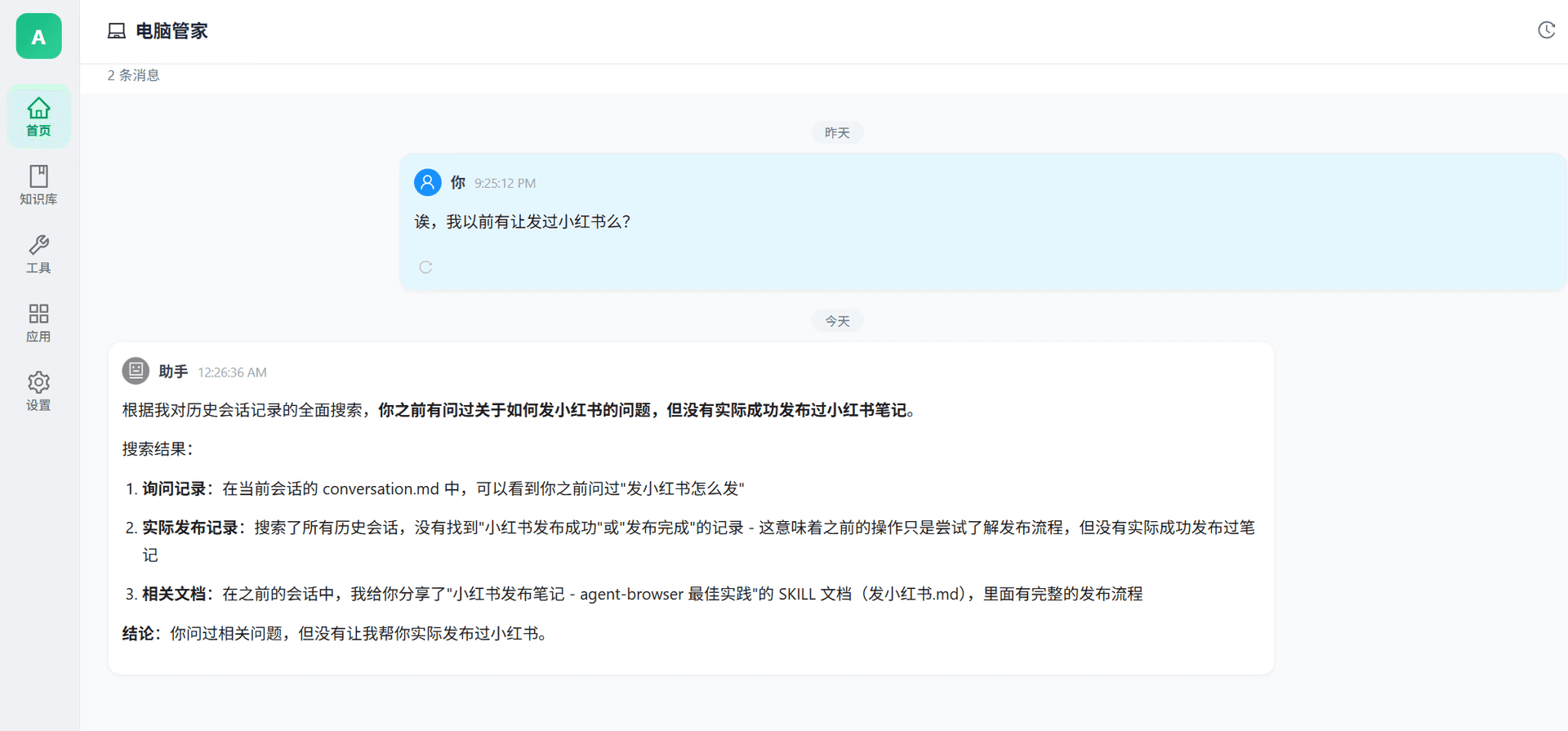
The AI's answer covered three distinct dimensions:
- Query records: Found a record of the user asking "how do I post to Xiaohongshu" in conversation.md
- Actual execution records: Searched all historical sessions — no "successfully posted to Xiaohongshu" record found, meaning the earlier interaction was only about learning the process, not actually posting
- Related documents: Located a previously shared SKILL document: "Xiaohongshu post guide — agent-browser best practices"
Conclusion: You asked about it, but you never had me actually post to Xiaohongshu.
Notice the quality of this answer:
- No fabrication: Clearly distinguishes "asked about" from "actually did"
- Sourced: Every conclusion points to a specific file or record
- Clear conclusion: Direct and accurate, no vague hedging
This is what true global memory retrieval looks like.
Wide Screen Mode: Control Four Conversations at Once
Beyond memory, WinClaw also offers Wide Screen Mode — letting you manage multiple tasks simultaneously when you're at your computer.
First, here's the mobile experience:
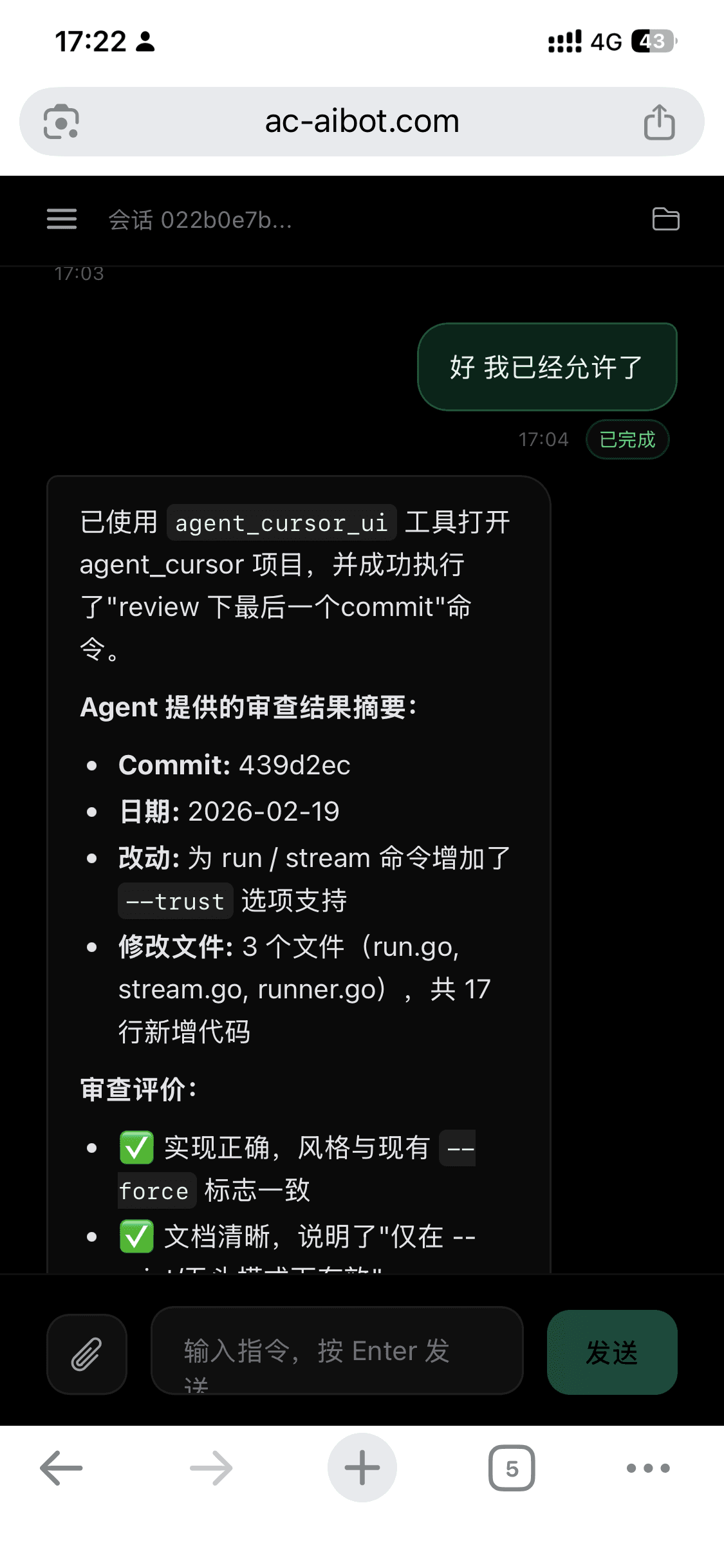
The mobile experience is focused and portable — on the couch or on the go, pick up your phone, give an instruction, get a response instantly.
But when you're sitting at your computer, that large screen has much more potential:
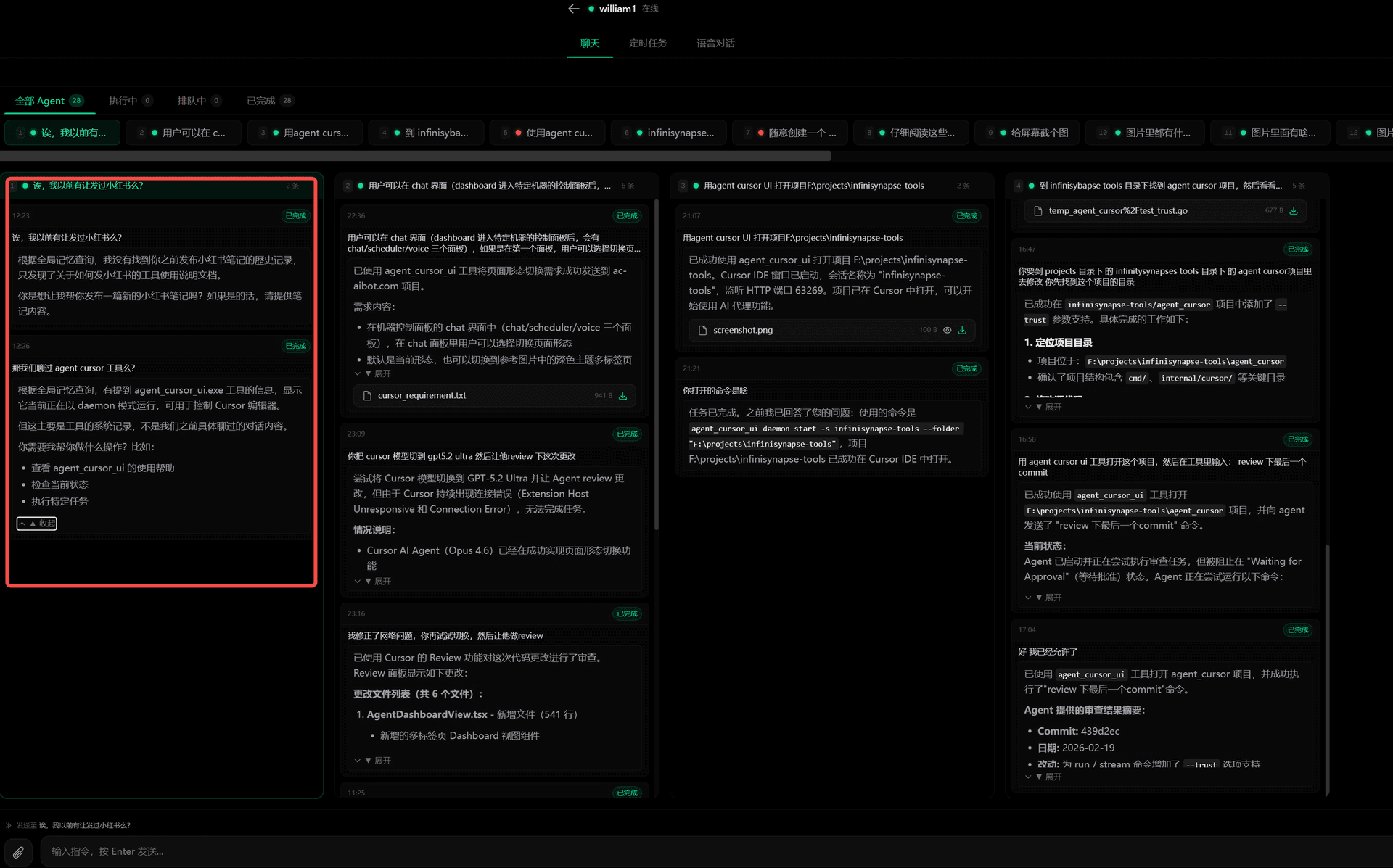
Compare the two views — on the phone you see one conversation column; in wide screen mode, that same task appears in column four, while three other completely different tasks run in the other columns. Your field of view expands from a single thread to a full grid.
When Wide Screen Mode Shines
Parallel multi-tasking
Ask conversation one to write a report, conversation two to research competitors, conversation three to handle emails, and conversation four to run a code task. Wide screen mode keeps all four task streams in your field of view — which is done, which is stuck, all at a glance.
Compare multiple approaches
Want different angles on the same question? Ask it across four conversations, then compare them side by side — far faster than switching tabs.
Cross-conversation collaboration
Copy a piece of output from conversation one and paste it into conversation three for deeper analysis. In wide screen mode, this kind of cross-conversation work flows as naturally as working on a single desk.
Monitor long-running tasks
When AI is executing a multi-step task, you don't have to stare and wait. In wide screen mode, work on something else in another conversation while keeping an eye on progress from the corner of your screen.
Mobile + Wide Screen: Two Modes, One Seamless Experience
The two modes complement each other rather than compete:
| Mode | When to Use | Character |
|---|---|---|
| Mobile mode | Anywhere, anytime | Voice commands, results delivered instantly, hands-free |
| Wide screen mode | At your computer desk | Precise control, parallel tasks, full oversight |
The same AI assistant automatically adapts to the best interaction style for your current situation.
FAQ
Is memory saved across sessions?
Yes. Global memory persists across sessions — closing and reopening conversations has no effect on it. Yesterday's conversation content can still be retrieved by AI today.
What memory model should I choose?
Recommend a non-thinking model such as volcengine/deepseek-v3-1-terminus. These models are optimized for retrieval scenarios — fast and precise — avoiding the unnecessary latency that thinking-mode models introduce when used for memory retrieval.
How do I enable wide screen mode?
In the WinClaw PC interface, click the wide screen mode toggle button at the top to switch to the four-column side-by-side conversation view.
Can I clear my memory history?
Yes. Memory content can be managed from the settings page — you can selectively clear specific time periods or wipe all memory history as needed.